Traditional MTProto is easily blocked by DPI? TGV has deployed the official tproxy-server architecture first. You can get exclusive Web-Proxy parameters directly after registration.
Claim 3-Day Free Trial →Web-Proxy is a brand new protocol. Currently, only the following official clients support it. If you cannot find the "WEB" option in your App, it means your version is too old. Please upgrade first:
- Telegram Desktop: Version ≥ 7.1.0 (PC)
- Android: Requires the latest Telegram Beta version
- iOS: Official rollout is in progress, please keep your app updated
Step 1: Get Your Web-Proxy Parameters
After you purchase or try the Web-Proxy service at TGV, you will receive a very special set of parameters. Unlike traditional proxies, it has no port number.
You will receive the following two strings (usually shown in the email or dashboard):
- Proxy server: A domain like
proxy.example.comkapaproxy.example.com/path. Note: Do NOT include https:// or port number. - Proxy secret: A 32-character hexadecimal string or a specific format secret (e.g.,
000102030405060708090a0b0c0d0e0f).
Step 2: Configure Telegram Client
Method 1: One-Click Automatic Import (Fastest)
TGV dashboard or email will include a link like https://t.me/webproxy?server=...&secret=....
- Copy this link on your phone or computer.
- Send it to "Saved Messages" or any chat on Telegram.
- Click the link directly, and Telegram will automatically pop up a prompt.
- Confirm the addition to complete the configuration.
Method 2: Manual Setup (Step-by-Step)
If you cannot use the one-click link, please follow these steps to configure manually:
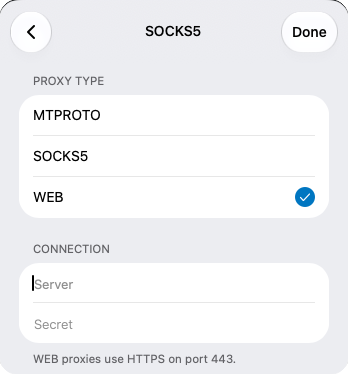
- Open Telegram, go to Settings -> Data and Storage -> Proxy.
- Click the "Add Proxy" button.
- The most critical step: in the type selection, you must choose WEB (do not choose MTPROTO or SOCKS5).
- In the Server field, enter the domain you received (e.g.,
proxy.example.com). - In the Secret field, paste the 32-character secret you received.
- Click Done to save, and enable the proxy.
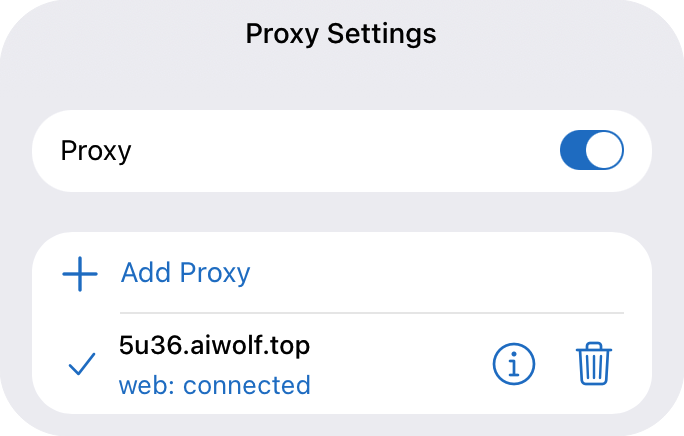
Tallaad 3: Sidee loo xaqiijiyaa habaynta guulaysatay?
Ka dib habaynta, ku noqo bogga Proxy Settings. Haddii aad aragto "web: connected" sida sawirka hoose, waxay ka dhigan tahay inaad si guul leh ugu xidhiidhay Telegram iyada oo loo marayo Web-Proxy-ga rasmiga ah.
Halkaan, taraafikadaadu waxay u eg tahay baaritaanka HTTPS caadiga ah. Darbiyada DPI ma awoodaan inay gartaan inaad isticmaalayso proxy, taasoo si weyn u yaraynaysa khatarta xannibaadda.
Tallaad 4: Su'aalo badanaa la weydiiyo
1. Maxaan "WEB" uga maqanahay Telegram-kayga?
Sida kor ku xusan, nooca macmiilkaagu aad buu u duug yahay. Fadlan soo dejiso nooca desktop-ka ugu dambeeya ee ka soo baxa website-ka rasmiga ah ee Telegram ama ku biir barnaamijka Beta ee Google Play.
2. Maxaan sameeyaa haddii ay tidhaahdo "Proxy connection failed"?
- Hubi haddii goobta Server ay ku jiraan
https://ama lambarka port-ka (Web-Proxy waxay u baahan tahay oo kaliya domain-ka cad). - Hubi haddii Secret-ka si buuxda loo koobiyeeyay iyada oo aan lahayn meelo bannaan oo dheeraad ah.
- Isku beddelka shabakadda ayaa marmar sababi kara guuldarrooyin xidhiidh. Isku day dhowr jeer ama sug dhowr daqiiqo.
3. Kee baa ka wanaagsan, Web-Proxy mise MTProto caadiga ah?
Web-Proxy waa qaab-dhismeedka rasmiga ah ee ugu dambeeya, oo leh awood ka-hortagga xannibaadda aad uga sarreysa marka la barbardhigo MTProto caadiga ah. Gobollada ay baaritaanku aad u xun yahay sida Iran iyo Russia, Web-Proxy ayaa si aad ah uga sii socota muddo dheer. Si kastaba ha ahaatee, qalabka duugga ah ee aan taageerin borotokoolkan, MTProto wali waa loo baahan yahay si loo kaydiyo.