Traditional MTProto is easily blocked by DPI? TGV has deployed the official tproxy-server architecture first. You can get exclusive Web-Proxy parameters directly after registration.
Claim 3-Day Free Trial →Web-Proxy is a brand new protocol. Currently, only the following official clients support it. If you cannot find the "WEB" option in your App, it means your version is too old. Please upgrade first:
- Telegram Desktop: Version ≥ 7.1.0 (PC)
- Android: Requires the latest Telegram Beta version
- iOS: Official rollout is in progress, please keep your app updated
Step 1: Get Your Web-Proxy Parameters
After you purchase or try the Web-Proxy service at TGV, you will receive a very special set of parameters. Unlike traditional proxies, it has no port number.
You will receive the following two strings (usually shown in the email or dashboard):
- Proxy server: A domain like
proxy.example.comauproxy.example.com/path. Note: Do NOT include https:// or port number. - Proxy secret: A 32-character hexadecimal string or a specific format secret (e.g.,
000102030405060708090a0b0c0d0e0f).
Step 2: Configure Telegram Client
Method 1: One-Click Automatic Import (Fastest)
TGV dashboard or email will include a link like https://t.me/webproxy?server=...&secret=....
- Copy this link on your phone or computer.
- Send it to "Saved Messages" or any chat on Telegram.
- Click the link directly, and Telegram will automatically pop up a prompt.
- Confirm the addition to complete the configuration.
Method 2: Manual Setup (Step-by-Step)
If you cannot use the one-click link, please follow these steps to configure manually:
- Open Telegram, go to Settings -> ወደ -> Proxy.
- Click the "Add Proxy" button.
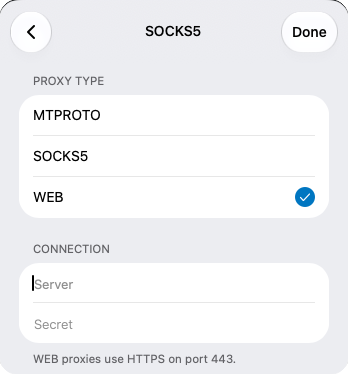
- The most critical step: in the type selection, you must choose WEB (do not choose MTPROTO or SOCKS5).
- In the Server field, enter the domain you received (e.g.,
proxy.example.com). - In the Secret መስክ፣ የተቀበሉትን 32-ቁምፊ ምስጢር ይለጥፉ።
- ለማስቀመጥ Done ን ይጫኑ፣ እና ፕሮክሲውን ያንቁ።
ደረጃ 3፡ የተሳካ ውቅርን እንዴት ማረጋገጥ ይቻላል?
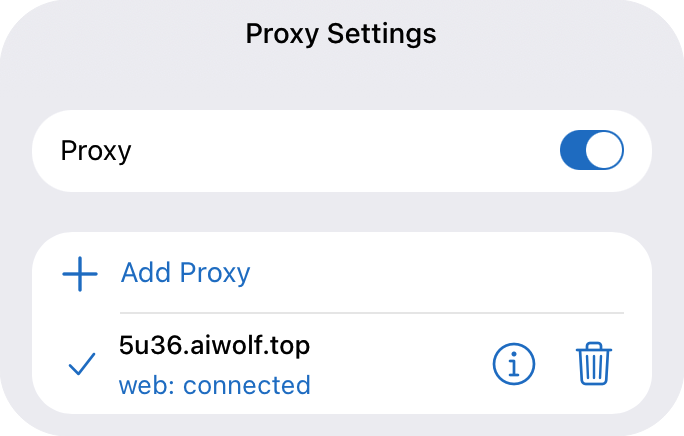
ካዋቀሩ በኋላ፣ ወደ Proxy Settings ገጽ ይመለሱ። ካዩ "web: connected" ከታች ባለው ስክሪንሾት ዓይነት፣ ማለት በኦፊሴላዊው Web-Proxy በኩል ወደ Telegram በተሳካ ሁኔታ ተገናኝተዋል ማለት ነው።
በዚህ ጊዜ፣ ትራፊክዎ እንደ መደበኛ HTTPS የድር አሰሳ ተሸፍኗል። DPI አግዳሚ ግድግዳዎች ፕሮክሲ እየተጠቀሙ መሆንዎን ሊለዩ አይችሉም፣ ይህም የመዘጋት አደጋን በእጅጉ ይቀንሳል።
ደረጃ 4፡ ተደጋጋሚ ጥያቄዎች
1. ለምን በTelegram ውስጥ "WEB" አማራጭ የለም?
ከላይ እንደተጠቀሰው፣ የደንበኛዎ ስሪት በጣም ያረጀ ነው። እባክዎ የቅርብ ጊዜውን የዴስክቶፕ ስሪት ከ ኦፊሴላዊ Telegram ድህረ ገጽ ያውርዱ ወይም በGoogle Play ላይ የBeta ፕሮግራሙን ይቀላቀሉ።
2. "Proxy connection failed" ካለ ምን ማድረግ አለብኝ?
- የServer መስክ ተጨማሪ
https://ወይም የፖርት ቁጥር ካለው ያረጋግጡ (Web-Proxy ቀላል ጎራ ብቻ ይፈልጋል)። - ምስጢሩ ያለ ምንም ተጨማሪ ክፍተቶች ሙሉ በሙሉ መቅዳቱን ያረጋግጡ።
- የኔትወርክ መለዋወጥ አልፎ አልፎ የግንኙነት ውድቀቶችን ሊያስከትል ይችላል። ጥቂት ጊዜያት ይሞክሩ ወይም ጥቂት ደቂቃዎችን ይጠብቁ።
3. የቱ ይበሻል፣ Web-Proxy ወይስ ባህላዊ MTProto?
Web-Proxy የቅርብ ጊዜው ኦፊሴላዊ መሠረታዊ አርክቴክቸር ነው፣ ከ እጅግ የላቀ የመከላከል አቅም ከባህላዊ MTProto ጋር ሲነጻጸር። እንደ ኢራን እና ሩሲያ ባሉ ከባድ ሳንሱር ባለባቸው ክልሎች፣ Web-Proxy በጣም ረጅም ጊዜ ይቆያል። ነገር ግን፣ ይህን ፕሮቶኮል ለማይደግፉ አሮጌ መሣሪያዎች፣ MTProto አሁንም እንደ ምትኬ ያስፈልጋል።